Finding the best HRMS software in India is challenging, as every business has different HR needs and feature expectations. To simplify your search, here are the 15 best HRMS solutions selected based on business size, features, ratings, cost-effectiveness, and productivity.
HRMS Software is a digital platform that automates core HR functions, including payroll, employee data, recruitment, attendance, performance management, and more.
It acts as a secure data repository that improves HR efficiency, reduces manual errors, enhances employee engagement, and supports growing business needs while maintaining productivity and employee retention. Companies deploy them to replace manual spreadsheets and paperwork in HR.
India’s HR landscape has undergone major changes, including the introduction of four Labour Codes that replaced 29 central labour laws, the shift to permanent hybrid workforces, and the DPDP Act 2023, which mandates stricter employee data governance. These developments have made manual HR processes a compliance and operational liability for any growing Indian business. Businesses can also opt for a demo to understand how modern HR software streamlines compliance and workforce management.
HRMS platforms stay updated with labour laws like the DPDP Act and New Wage Codes for 100% compliance.
HRMS tools like geo-fencing, mobile ESS, and remote attendance have become essential for modern HR.
Consolidated performance and payroll management and talent acquisition reduce associated costs.
Machine Learning, predictive analytics, and other AI features help automate repetitive administrative tasks.
Track performance, attendance, and attrition with live dashboards, enabling data-backed decisions.
Improve employee engagement and loyalty with self-service portals and transparent HR processes.
Here is a quick tabular overview to help you understand the main aspects of the top HRMS software in India:
| Sr. No | HRMS Software Name | Pricing | Best Feature | Best suited for | G2 Rating |
| 1 | Pocket HRMS | ₹2,995/mo (50 emp) | AI-backed automation | Mid to Enterprises | ★★★★☆ 4.5/5 |
| 2 | factoHR | Custom pricing | Attendance & payroll | SME, field teams | ★★★★☆ 4.6/5 |
| 3 | GreytHR | ₹4,495/mo (50 emp) | Compliance tools | Compliance-heavy orgs | ★★★★☆ 4.5/5 |
| 4 | BambooHR | Custom pricing | Integrations & interface | MNC, India offices | ★★★★☆ 4.5/5 |
| 5 | Darwinbox | Custom pricing | Automation & analytics | Mid to Enterprises | ★★★★☆ 4.3/5 |
| 6 | Keka | ₹6,999/mo (100 emp) | Robust payroll | SME to Mid-market | ★★★★☆ 4.4/5 |
| 7 | HRone | Custom pricing | Flexible HR workflows | Small to mid-size | ★★★★☆ 4.6/5 |
| 8 | RazorpayX Payroll | ₹100/user/mo | Payroll & compliance | Startups | ★★★★☆ 4.2/5 |
| 9 | uKnowva | Custom pricing | Customization | Small to mid-size | ★★★★★ 4.7/5 |
| 10 | Zimyo | Custom pricing | AI-backed automation | SME, automation-focused | ★★★★☆ 4.5/5 |
| 11 | Qandle | ₹2,450/mo (50 emp) | Analytics & reporting | Startups to enterprise | ★★★★☆ 4.4/5 |
| 12 | Kredily | Free / ₹3,499/mo (50 emp) | Database & analytics | Small businesses | ★★★★☆ 4.3/5 |
| 13 | ZingHR | Custom pricing | Recruitment & onboarding | Mid to Large enterprises | ★★★★☆ 4.2/5 |
| 14 | Zoho People | ₹48/user/mo | Seamless integrations | Startups, Zoho users | ★★★★☆ 4.3/5 |
| 15 | SumHR | ₹49/user/mo | Attendance & HR | SME to mid-market | ★★★★☆ 4.1/5 |
We have curated a list of the best HR software for employee management in India for start-ups to medium organizations.
The HR software mentioned above provide a good balance between features and cost, as most of them are deployed on the cloud, a desirable feature for most companies. Additionally, almost all of them have a dedicated employee self-service portal, which is essential to improve engagement. According to ADP’s Future of Pay in India 2025 report, 47% of Indian HRs cite data analytics limitations as a major challenge, highlighting the need for AI-driven payroll insights. Having a robust HRMS software helps avoid such hurdles, enabling streamlined payroll calculations, automated statutory deductions, and in-depth analytics.

Some of them also provide the same functionalities on mobile platforms with the help of dedicated mobile apps. We’ve also put together a useful list of the best payroll software in India. This list provides information about the features and pricing of each software. You can access all this information in our article.
So, let us look at the 15 top HR software in India for managing employees.

Pocket HRMS is an innovative AI-enabled cloud-based HRMS software for mid-size businesses and enterprises. It comes with a dedicated ‘smHRt suite’ of enhancements that helps it go beyond a normal HRMS software. Being a scalable and highly customizable solution, it has become the go-to choice for growing businesses.
Pocket HRMS has an excellent track record with over 2000 companies trusting its exceptional automation capabilities. With more than 5500 HRs using the system to manage more than 5 million employees daily, Pocket HRMS has become the cornerstone in providing a steady service. Combined with 3-minute payroll processing, 1-click payslip disbursal, instant data retrieval, and more, it enables HR teams to stay on top of their tasks.
Having such robust modules has resulted in Pocket HRMS being bestowed with various awards like ‘Best HR Solution Provider’ at the 7th Edition of CHRO Vision and Innovation Summit, ‘Best Innovative Mobile App’ by the 18th India Digital Summit by IAMAI, ‘Best Customer Support’ by Software Suggest, and more.
Pricing for the subcription starts at ₹2495/month for 50 employees
Longer implementation with customizations
Extra training for advanced features
Feature-rich UI might be overwhelming for 1st time users.

factoHR is mobile-friendly HR Payroll software. It handles entire payroll processing from start to finish to ensure accurate, on-time payments. It comes with various excellent automation features that help HR teams optimize their operations efficiently.
Founding Year: 2016
G2 Rating: 4.6
From what We’ve seen, it’s really geared toward mid-sized companies up to the big corporate players.
They let you test it out first (which is how they got us), then you’ll need to talk to their salespeople for pricing based on your company’s size and needs.
Robust mobile-first HRMS experience
Good attendance & biometric integrations
User-friendly user interface.
Limited advanced analytics capabilities
Limited payroll flexibility
Fewer Al-driven features.

greytHR is another cloud-based HR software in India that provides its users with an intuitive experience and streamlined workflows. It automates multiple aspects of HR management, such as payroll, attendance, leave, performance, engagement, recruitment, and more.
Founding Year: 1994
G2 Rating: 4.5
The Growth Plan starts at ₹4495/month for 50 employees.
Comparatively outdated UI
Limited scalability
Basic analytics & reporting.

BambooHR is a famous hire-to-tire solution for organizations that want to simplify their processes. This comprehensive solution has an intuitive user interface that provides a smooth user experience.
Founding Year: 2008
G2 Rating: 4.5
Not Disclosed
Clean and intuitive user experience
Strong employee database & HR workflows
Excellent reporting capabilities.
Limited customization options
Expensive for Indian companies.

Darwinbox is a cutting-edge mobile-first HR suite, that ensures automation of day-to-day HR processes, simplifies HR interactions, and provides essential insights inputs of HR modules that efficiently help HR undertake their tasks.
Founding Year: 2015
G2 Rating: 4.3
The pricing is available on request. Anyone can get pricing by sending a quote today.
Enterprise-grade scalability
Strong automation and workflows
Advanced analytics & dashboards.
Higher implementation cost
Complex setup for smaller companies
Might not be suitable for SMBs.

Keka is one of the best HR software for employee management in India due to its pioneering approach to solving the problem of employee engagement. They have an easy-to-use interface and intuitive design for enhanced employee engagement.
Founding Year: 2014
G2 Rating: 4.4
Starts at ₹6999/month for 100 employees and ₹60 per additional employee per month.
Strong payroll management
Modern user interface
Robust HR automation.
Limited customization flexibility
Pricing on the higher side
Limited reporting options.

HROne is another significant core HR system provider that is a complete hire-to-retire solution. They have also developed the ‘Inbox-for-HR’ tool that makes employee management as intuitive as an email client.
Founding Year: 2016
G2 Rating: 4.6
Not Disclosed
Good HR workflow automation
User-friendly mobile app
Strong document management.
UI may feel cluttered for new users
Limited advanced reporting
Inconsistent customer support.

RazorPayX Payroll is a payroll software that automates compliance and enables companies to distribute salaries to employees with just a few clicks. It provides tools like the TC calculator allowing employees to get pay stubs, and manage their leaves through a self-service interface.
Founding Year: 2019
G2 Rating: 4.2
Starts at ₹100/month per user
Seamless payroll with banking integration
Simple and fast payroll processing
Startup-friendly.
Limited full HRMS capabilities
Not suitable for large enterprises
Basic HR features beyond payroll.

AI-powered digital workplace platform with automated capabilities — trusted by SMBs and growing enterprises.
uKnowva is an AI-driven digital workplace platform that combines HRMS, intranet, collaboration, and performance management into a unified solution. Designed for modern organizations, it helps streamline employee lifecycle management while enhancing communication, engagement, and productivity. With built-in AI bots, social intranet features, and workflow automation, uKnowva is well-suited for companies looking to digitize both HR operations and internal collaboration in one platform.
Founding Year: 2010
G2 Rating: 4.7
Small to mid-sized businesses (100–5,000 employees)
Custom pricing
Modular and flexible HRMS
Good collaboration tools
Customizable workflows.
Ul feels outdated
Learning curve for new users
Limited ecosystem integrations.

Zimyo has targeted itself as an employee experience-enhancing tool. While they have all the core HR software modules, their focus is on enhancing employee experience using key features like an employee self-service portal, mobile app, etc.
Founding Year: 2018
G2 Rating: 4.5
Not Disclosed
Affordable pricing
Good employee engagement tools
Easy onboarding process.
Limited payroll depth
Basic analytics
Scaling challenges for larger companies.

Qandle is a hire-to-retire HR platform with a user-friendly approach. They provide core HR software at a comparatively low price, with specialized tasks such as timesheet management, roster management, etc., requiring paid add-ons.
Founding Year: 2016
G2 Rating: 4.4
Starts at ₹2450/month for 50 employees
Clean UI and easy navigation
Strong leave & attendance management
Good automation features.
Limited payroll capabilities
Inadequate reporting depth
Fewer integrations.

Kredily is a cloud-based human resources and payroll management software platform designed to simplify and streamline HR processes for small and medium-sized businesses (SMBs) in India. It offers a range of modules to manage employee data, attendance, leave, payroll, compliance, performance, and more.
Founding Year: 2017
G2 Rating: 4.3
The Professional plan is ₹3499 per month for 50 employees with ₹70 per additional employee.
Free payroll plan available
Easy to use for small businesses
Good compliance features.
Limited scalability
Basic feature set
Limited customization.

ZingHR is one of the few significant core HR software, which provides smooth integration with biometric features that make login-logout easier for employees. Besides, it offers auto calculation and TDS calculation features to streamline HR practices.
Founding Year: 2014
G2 Rating: 4.2
Not Disclosed
Strong compliance and enterprise features
Good workflow automation
Multi-country support.
Ul can be complex for new users
Implementation takes time
Comparatively higher cost.

Zoho People is a cloud-based HR management platform that improves employee experience to ensure enhanced employee engagement. Their primary goal is to develop the agility and effectiveness of the HR teams to help them handle their daily activities like performance management with the utmost efficacy.
Founding Year: 2008
G2 Rating: 4.3
Starts at ₹48/month/user
Integrated with Zoho ecosystem
Highly flexible workflows
Affordable pricing.
Payroll requires separate module
Limited advanced analytics
UI can feel inconsistent.

SumHR is one of the best cloud-based human resources management software designed to streamline and automate entire HR practices. It offers a range of special features like Zero Balance Account, Free Health Insurance benefits, On-Demand Advance Salary, along with helping organizations manage employee data, attendance, leave, payroll, performance, and more.
Founding Year: 2010
G2 Rating: 4.1
Starts at ₹ 49 per user/month, billed annually
Simple and easy-to-use interface
Good for startups and SMBs
Quick implementation.
Limited advanced features
Basic reporting capabilities
Not ideal for large enterprises.
Choosing an HRMS should not rest on marketing claims. To keep this comparison fair and useful, we assessed every tool in this list against the same set of criteria.
Here’s what we looked for when evaluating these HRMS software options:
A robust HRMS software auto-calculates salaries, including CTC breakup, variable pay, arrears, and generates payslips. It should also be able to handle both New and Old Tax Regimes, ensuring compliance with employees who chose either of them.
The best HRMS auto-calculates PF (12% + 12%), ESIC (3.25% + 0.75%), TDS, and Professional Tax with state-wise slabs, and generates ECR challans and Form 130 (former Form 16). It also provides employees with the ability to download Form 130 whenever they require.
A good HRMS should also come with a dedicated mobile app, which is both intuitive to use and accessible to regional speakers with multi-language options. It should work on any mid-range Android or Apple smartphones, while also providing offline capability for field teams.
The HRMS software also provides biometric integration, geo-fencing for remote employees, selfie attendance, and shift management. It also automates leave policies, including CL, SL, EL, and comp-off, making it easier for employees to apply for leave and their managers to approve them.
Similarly, OKR tracking, 360-degree feedback, appraisal cycles, and probation confirmation workflows are all part of good HR software, as it reduces end-of-year appraisal bottlenecks significantly. Having the option to automate performance management also results in increased transparency in the process, helping improve overall productivity.
Modern HRMS also comes with ESS portals, where employees apply for leave, view payslips, update personal details, and raise IT declarations without contacting HR. It reduces HR ticket volume by 60–70%, making it easier for them to engage in strategic tasks instead of being interrupted by employees with repetitive queries.
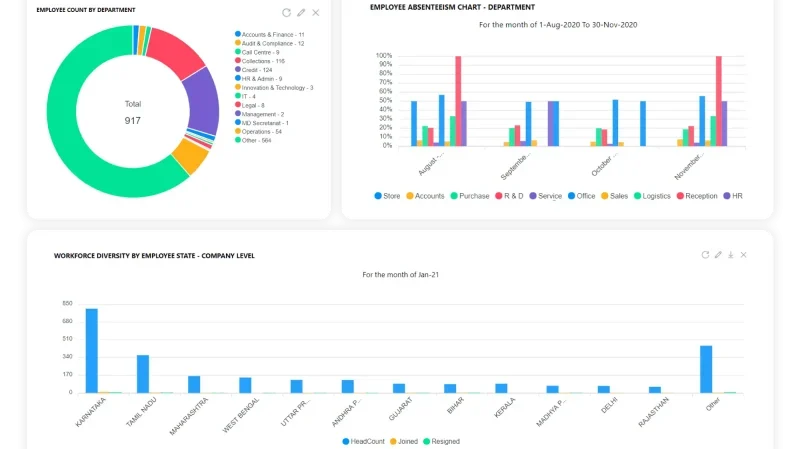
Additionally, HRMS systems come with live dashboards for headcount, attrition, payroll cost, and productivity. The latest systems also offer predictive attrition models that identify employee exit risks before they resign. Having access to visual dashboards and in-depth analytics enables HR teams to make informed decisions.
Advanced HRMS also provides native connectors to Tally, ERP systems, and banking portals for payroll disbursement. It also includes API-based biometric device integration, as well as an open API for custom tools, making it a part of integrated software deployment in an organization. Such integrated solutions also improve HR productivity, resulting in enhanced workforce management.
Choosing an HRMS is a long-term decision. Once your employee data, payroll history, and workflows live in a system, switching is expensive. These are the mistakes we see most often, and how to avoid them:
Indian payroll rules change often. PF and ESI contribution rules, professional tax slabs that vary by state, TDS regulations, and labour code updates all affect your payslips and filings. A system that handles compliance today but fails to update promptly can expose you to penalties.
What to do: Ask the vendor how quickly they roll out statutory updates, whether those updates are included in your plan, and whether the software supports every state you operate in.
A polished demo is meant to showcase the product at its best. It does not reveal how the software handles your shift patterns, your leave policies, or your salary structure.
What to do: Run a trial with your actual data, ideally one department or one payroll cycle. Test your most complicated scenarios using the system, and check how well it is able to handle the scenario.
Enterprise-grade modules for performance management, learning, and workforce analytics are impressive, but if your team of 60 needs only attendance, leave, and payroll, you are paying for features that are wasted in your organization.
What to do: List your must-have features before the first demo. Treat everything else as optional, and choose a vendor that lets you add modules as you grow. You should be able to add or remove modules based on your requirements.
Your HRMS works only if your employees use it. If employees find the app confusing, or managers keep approving leave over WhatsApp, your data becomes unreliable, and HR ends up doing double the work.
What to do: Involve a few employees and managers in the evaluation process. Check whether the mobile app is simple, fast, and works well on low-end phones and weak networks.
A low monthly fee can hide various kinds of extra charges. The vendor might charge additionally for implementation, data migration, extra users, premium support, hardware integration, etc.
What to do: Ask for a written quote covering the full cost over three years, including setup, training, support, and any per-module or per-employee fees. It will help you avoid unpleasant surprises once you sign the contract.
Moving employee records, salary histories, leave balances, and tax declarations from spreadsheets or an old system is rarely a copy-and-paste job. Errors at this stage cause costly payroll mistakes later.
What to do: Ask what migration support is included, how long it typically takes, and who validates the data before you go live.
Your HRMS needs to work with your existing tools, such as biometric devices, accounting software, ERP, and banking systems. Missing integrations mean manual workarounds.
What to do: Confirm integrations with the exact tools and device models you use, and ask for customer references with a similar setup, if possible.
When payroll is due, slow support is a serious problem. And since an HRMS stores sensitive personal and financial data, weak security remains a major risk as long as you are using the system.
What to do: Check support hours and channels, response-time commitments, data hosting location, encryption, role-based access controls, and backup practices.
These are the measurable outcomes Indian businesses report after implementing HRMS software — based on our customer interviews and published case studies.
Reduction in HR processing time
Compliance penalties
Drop in HR ticket volume
Faster onboarding
Improvement in employee retention
Data-driven HR decisions
An HRMS software helps your HR team keep your employees engaged and satisfied with your organization. It stores your data securely and improves HR efficiency by multiple times. Being such a relevant tool, follow these steps before finalizing the HRMS software for your organization:
Start with problems, not features. Payroll errors? Manual attendance? Compliance fines? Identify your top pain points, then evaluate which HRMS solves them directly. Involve your HR team, as well as the accounts department, to identify the challenges they are facing daily.
Check with vendors about PF, ECR challan generation, ESIC monthly returns, state-wise PT slabs, Form 130 automation, and Labour Code updates. Check how quickly they update the system once there are any changes in the statutory regulations.
Match your problems with features. Ensure the main features resolve your issues before checking for other fancy features. Check for custom pricing options based on your requirements, as well as whether they can customize their system for your business.
Check compatibility with your existing tools. Verify whether all tools function according to your requirements within the HRMS software. Ensure that your systems can interact smoothly and accomplish tasks seamlessly.
Request a demo that processes your actual salary structure, runs compliance reports for your state, and shows the mobile app on a real mid-range Android device. A live demo will provide a complete picture of how well the software is optimized for your HR operations.
Ask for SLA guarantees in IST, dedicated vs. shared account managers, and escalation processes. Check out their customer support options, such as calls, chat, email, etc., along with their timings. Ensure that there are escalations available for emergency cases.
Managing the entire employee lifecycle, from hiring to exit management, is no longer optional but a fundamental business requirement. Hence, implementing an HRMS solution is essential to certify the efficiency, handle compliance, and ensure consistency across HR functions. A robust HRMS streamlines processes, reduces manual effort, and supports organisational growth. Among all the solutions available in India, Pocket HRMS is considered a comprehensive platform for startups and mid-sized businesses, offering AI-driven automation via the smHRty chatbot, full compliance with Indian statutory requirements, and a transparent pricing structure
There are multiple factors to consider when trying to find the best HRMS software in India, such as number of employees, company structure, etc. The popular options include Pocket HRMS, Facto HR, Keka, etc., who provide in-demand features at affordable prices.
HRMS software pricing in India typically ranges from ₹50 to ₹200 per employee per month, depending on features like payroll, attendance, performance management, and integrations. Many providers also offer customized pricing for enterprises.
Yes, HRMS software is suitable for both small and medium-sized businesses as it helps them centralize employee information and automate processes such as payroll, attendance, leave, and employee requests. Businesses can select a plan that can scale with their workforce.
The best HRMS software should include payroll processing, attendance management, leave tracking, employee self-service, statutory compliance, and performance management. Advanced tools also offer AI-based automation and analytics.
Yes, HRMS software is highly beneficial for startups as it automates HR processes, reduces manual errors, and ensures compliance from the early stages of business growth.
Yes, modern HRMS platforms can automate salary calculations, deductions, and statutory processes such as PF and ESI, reducing manual payroll work and compliance errors. As modern HRMS systems are cloud-based, they also remain up to date with changing regulations.
Most modern HRMS software integrates with accounting systems, biometric devices, ERP platforms, and communication tools, ensuring seamless data flow across departments.
The order of software listed in the blog does not intend to rank software based on function, price or performance. The intent of the blog is to inform the readers about various available options to help them make an informed decision.

Senior Content Writer

John Paul Davis is the Senior Content Writer at Pocket HRMS. His handiwork usually reflects the latest technologies in the HR domain. When he is away from his desk, you will find him on his other desk playing racing games or sketching cars.